
Introduction to TypeScript
Interfaces, Generics, Unions Explained
Why does TypeScript exist?
If JavaScript works, why was TypeScript created?
In the era of Artificial Intelligence, new web apps are shipping every minute. As codebases grow to hundreds of thousands of lines across distributed teams, JavaScript's dynamic nature becomes a liability:
Dynamic Typing Risks: Variables can switch types at runtime (
let data = 42; data = "hello";).Silent Failures: Accessing a non-existent property returns
undefinedinstead of throwing an immediate warning.Refactoring Nightmares: Renaming a property in one file can quietly break code in ten other files.
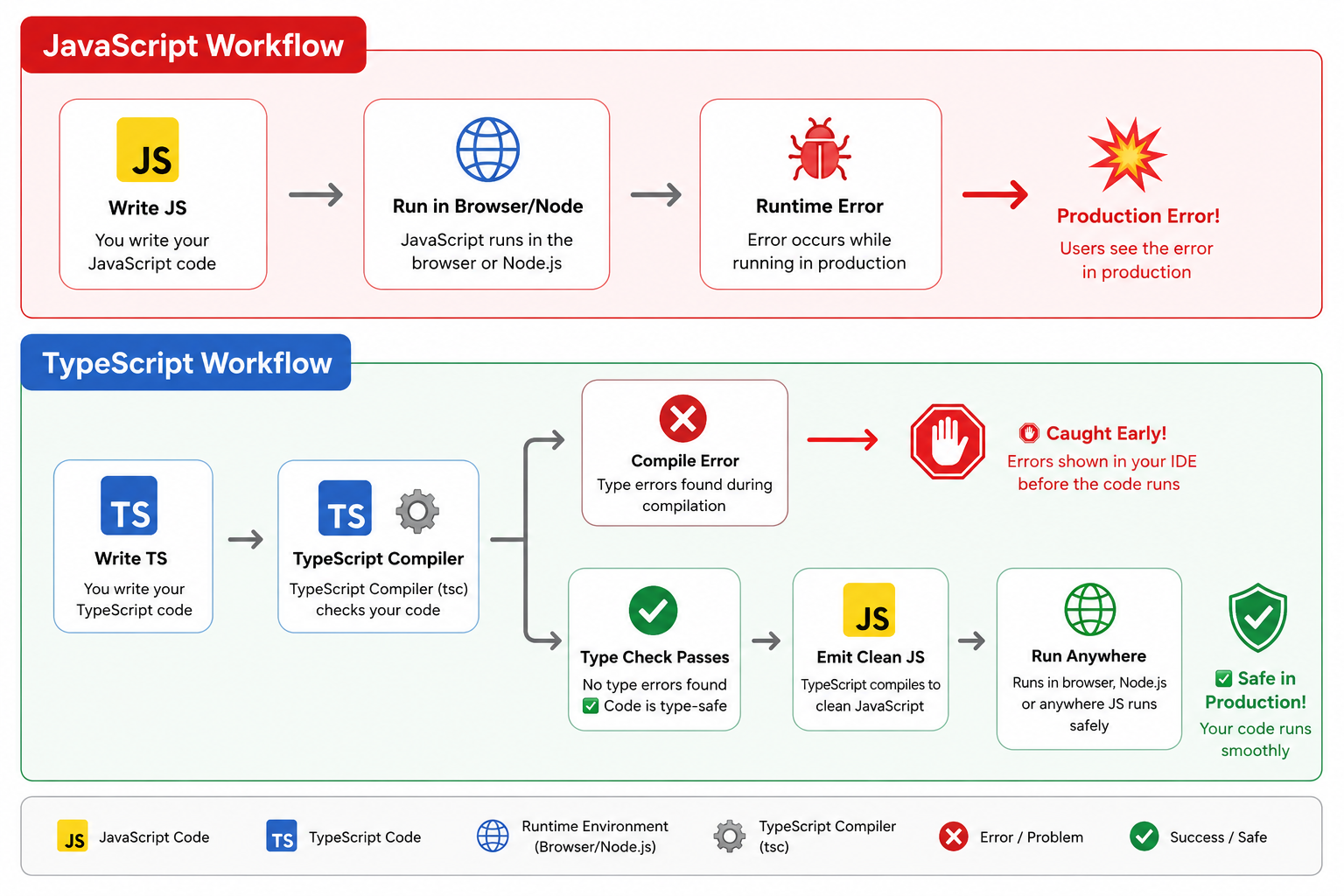
Runtime Errors vs. Compile-Time Errors
Runtime Error (JavaScript): The code executes, and the engine crashes only when the specific execution path runs in front of a user (e.g.,
TypeError: Cannot read properties of undefined (reading 'toUpperCase')).Compile-Time Error (TypeScript): The TypeScript engine analyzes the code statically as you type, highlighting mistakes in red before you save or push code to production.
// Plain JavaScript: Valid syntax, crashes at runtime
function calculateTotal(price, tax) {
  return price + (price * tax);
}
calculateTotal("100", 0.05); // Returns "1005" (string concatenation bug!)
// TypeScript: Caught immediately in your editor
function calculateTotal(price: number, tax: number): number {
  return price + (price * tax);
}
calculateTotal("100", 0.05);
// Error: Argument of type 'string' is not assignable to parameter of type 'number'.
Superset of JavaScript
TypeScript is not a separate programming language; it is a typed superset of JavaScript.
Every valid JavaScript file (
.js) is valid TypeScript (.ts).TypeScript adds an optional type layer on top.
Once compiled, all types are erased, leaving vanilla JavaScript.
Understanding Type Annotations
Type annotations explicitly tell the compiler what data type a variable, parameter, or return value should hold.
// 1. Variable Annotations
const appName: string = "ShipFlow";
const maxRetries: number = 3;
const isLive: boolean = true;

// 2. Function Parameters and Explicit Return Types
function formatPrice(amount: number, currency: string): string {
  return `${currency} ${amount.toFixed(2)}`;
}

// 3. Void Return (Functions that return nothing)
function logError(message: string): void {
  console.error(`[Error]: ${message}`);
}
Type Inference: Explicit vs. Inferred
TypeScript is smart enough to deduce types automatically based on assigned values. You do not need to annotate everything.
TypeScript
// Inferred as 'number' automatically
let itemCount = 5;
// itemCount = "five"; // Error: Type 'string' is not assignable to type 'number'

// Good practice: Let TS infer local variables, annotate function boundaries
let userName = "Siddharth"; // Inferred: string (no need for ': string')

// Annotate when declaring without initialization
let pendingOrderId: string;
pendingOrderId = "ord_98231";
Interfaces vs. Type Aliases
Both interface and type allow you to define structured contracts for objects like a User or Product.
Defining Data Contracts
// Using an Interface
interface User {
  id: string;
  name: string;
  email: string;
  age?: number; // Optional property
}

// Using a Type Alias
type Product = {
  id: string;
  title: string;
  price: number;
  inStock: boolean;
};
Extending Contracts
// Extending an Interface (uses 'extends')
interface AdminUser extends User {
  role: "admin" | "superadmin";
  permissions: string[];
}

// Extending a Type Alias (uses intersection '&')
type DiscountedProduct = Product & {
  discountPercent: number;
};
Comparison and Usage Rules
Feature | interface | type alias |
Primary Purpose | Defining the shape of objects/classes | Defining shapes, unions, primitives, and tuples |
Extensibility | Uses | Uses |
Declaration Merging | Allowed (duplicate names auto-merge) | Forbidden (throws duplicate identifier error) |
Can represent primitives? | No (only object/class shapes) | Yes (e.g., |
Use interface when modeling public APIs, database entities (User, Order), or object structures meant for inheritance.
Use type when defining unions (string | number), tuples, complex function signatures, or utility transformations.
Union Types
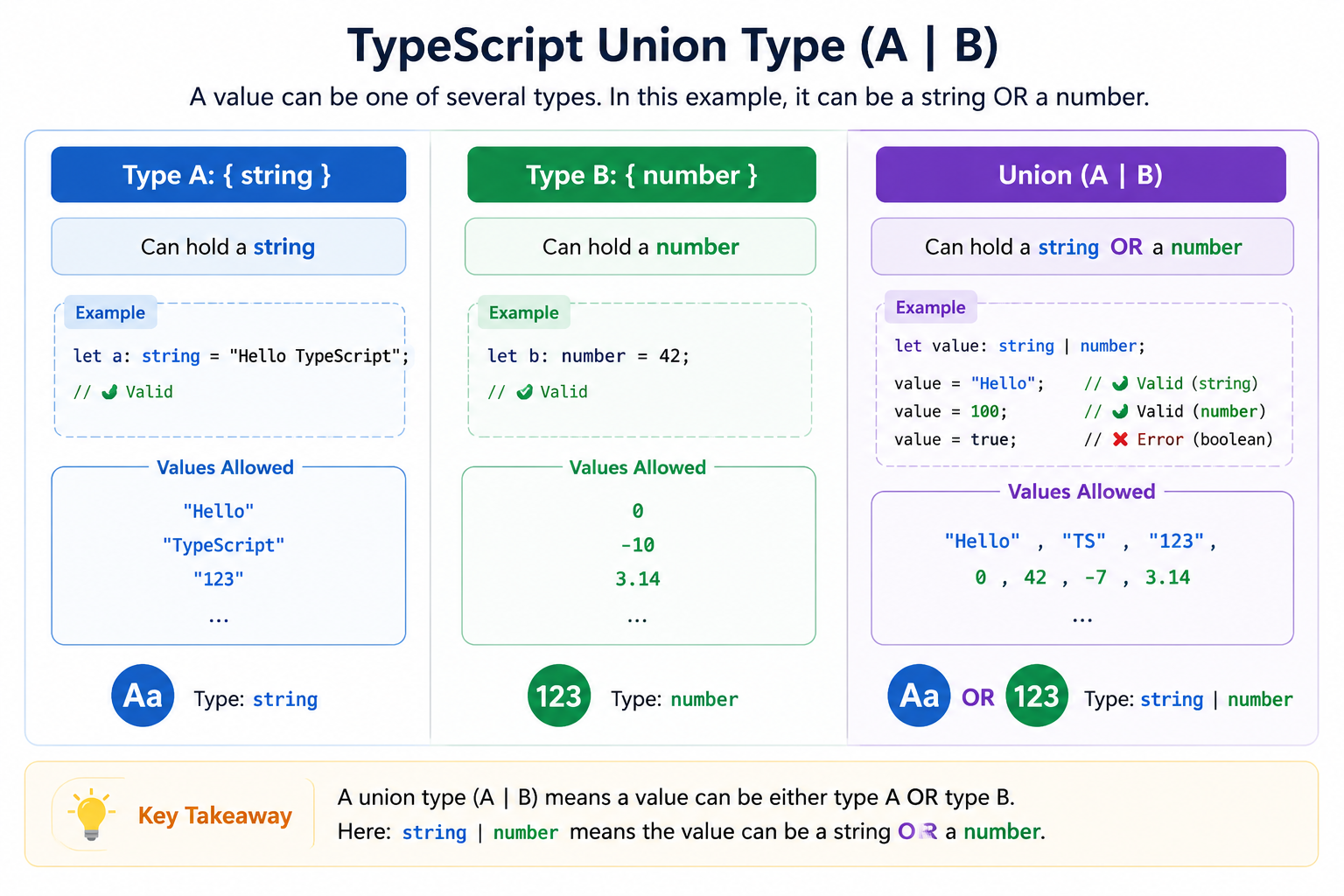
A union type allows a variable or parameter to be one of multiple types using the pipe operator (|).
Real-World Models
// Primitive Union
type OrderId = string | number;

// Literal Union (Strict set of values)
type PaymentStatus = "pending" | "completed" | "failed";

interface Order {
  id: OrderId;
  total: number;
  status: PaymentStatus;
}
Type Narrowing
Because a union can be multiple types, TypeScript forces you to verify the active type before calling type-specific methods:
function printReceipt(orderId: string | number) {
  // orderId.toUpperCase(); // Error: Property 'toUpperCase' does not exist on type 'number'.

  // Narrowing using typeof
  if (typeof orderId === "string") {
    console.log(`Receipt: ${orderId.toUpperCase()}`);
  } else {
    console.log(`Receipt: #${orderId.toFixed(0)}`);
  }
}
Intersection Types
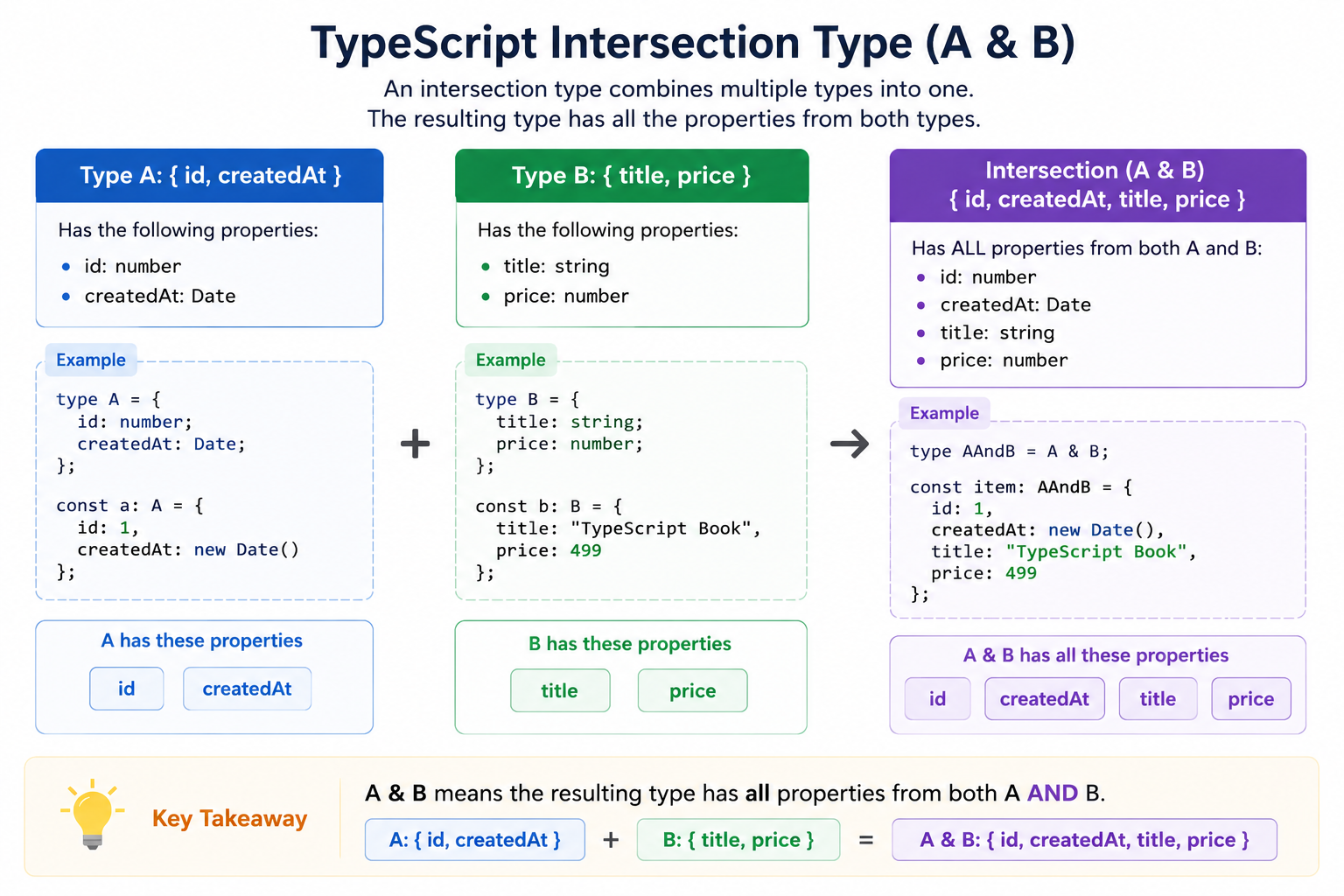
An intersection type combines multiple definitions into one using the ampersand (&). The resulting type must satisfy all combined contracts simultaneously.
Composing Reusable Structures
// Shared metadata across tables/entities
type Timestamps = {
  createdAt: Date;
  updatedAt: Date;
};

type Identifiable = {
  id: string;
};

// Core Domain Entity
type Article = {
  title: string;
  slug: string;
  content: string;
};

// Intersection: Reusable composite entity
type DatabaseArticle = Identifiable & Article & Timestamps;

const publishedPost: DatabaseArticle = {
  id: "post_101",
  title: "Mastering TypeScript",
  slug: "mastering-typescript",
  content: "TypeScript makes JS scalable...",
  createdAt: new Date(),
  updatedAt: new Date(),
};
Generic Functions
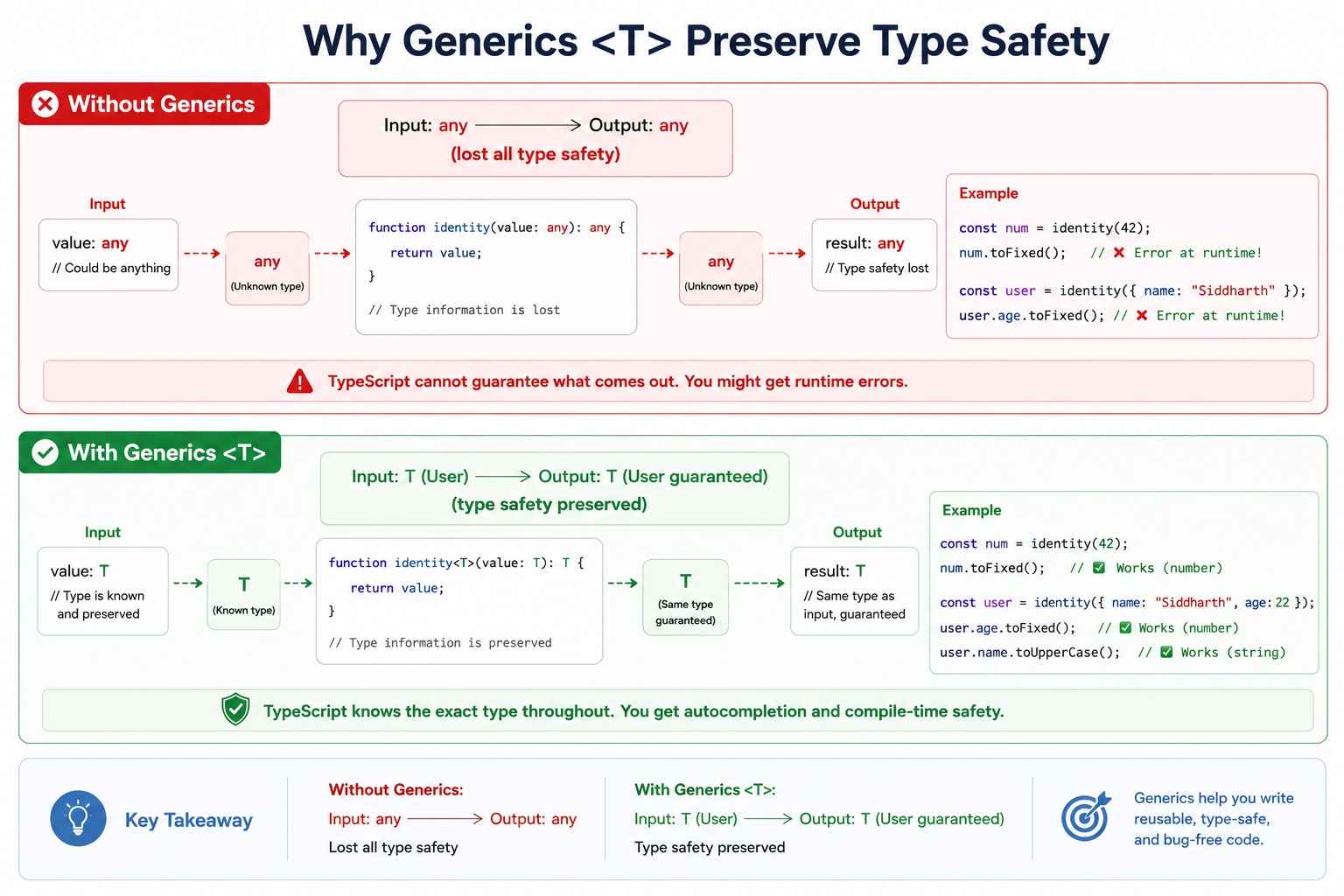
Generics are type variables. Instead of locking a function into a fixed type (number or string), or losing type safety with any, generics act as placeholders that capture the exact type passed in at call time.
Why Generics Are Needed
// Problem: Using 'any' drops compiler verification
function getFirstAny(items: any[]): any {
  return items[0];
}
const firstNum = getFirstAny([10, 20, 30]); // Type is 'any', no autocompletion

// Solution: Generic parameter <T> preserves the identity
function getFirstElement<T>(items: T[]): T {
  return items[0];
}

const num = getFirstElement([10, 20, 30]);        // Inferred: number
const user = getFirstElement([{ name: "Sid" }]);  // Inferred: { name: string }
Generic Constraints (extends)
Sometimes a generic cannot be just any type; it must guarantee certain properties (like having an .id or .length).
interface HasId {
  id: string;
}

// Constraint: T must have at least the properties defined in HasId
function findById<T extends HasId>(items: T[], targetId: string): T | undefined {
  return items.find((item) => item.id === targetId);
}

const inventory = [
  { id: "p1", name: "Keyboard", price: 75 },
  { id: "p2", name: "Mouse", price: 40 },
];

const foundItem = findById(inventory, "p1");
// foundItem is typed as { id: string, name: string, price: number } | undefined
Understanding tsconfig.json
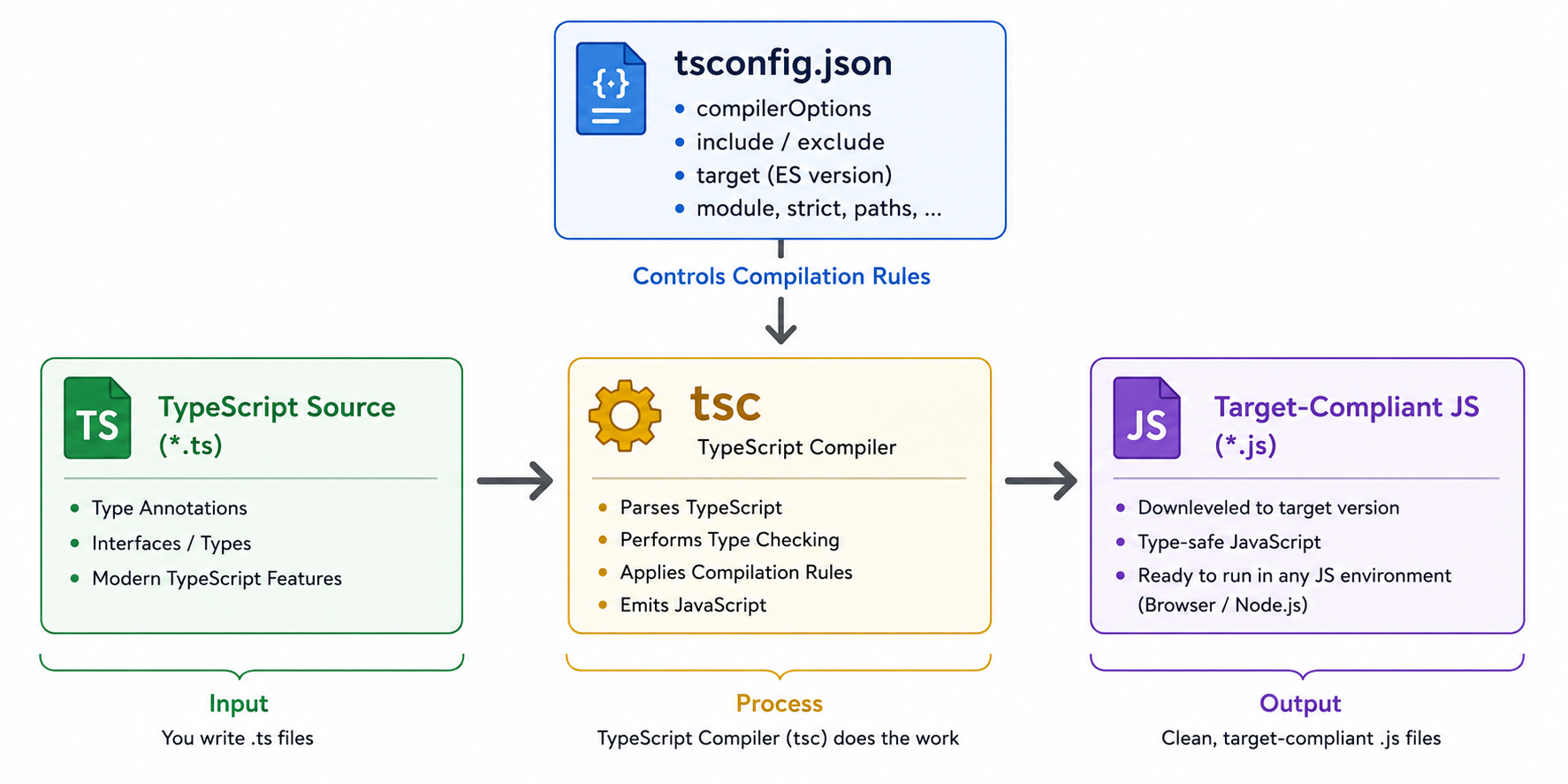
The tsconfig.json file resides at the root of a project. It specifies the root files and compiler flags required to transform TypeScript into plain JavaScript.
Standard Configuration
{
  "compilerOptions": {
    /* Target & Environment */
    "target": "ES2022",                // Output JavaScript version (ES6, ES2020, ES2022)
    "module": "NodeNext",              // Module system: CommonJS, ESNext, NodeNext
    "moduleResolution": "NodeNext",    // How TS looks up files on disk

    /* Type Checking Rigor */
    "strict": true,                    // Enables all strict type-checking options
    "noImplicitAny": true,             // Flags expressions where TS cannot infer a type
    "strictNullChecks": true,          // Ensures 'null' and 'undefined' are handled

    /* Emit Rules */
    "outDir": "./dist",                // Destination folder for compiled .js and .d.ts files
    "rootDir": "./src",                // Root directory of input TypeScript files
    "removeComments": true,            // Strips comments from output JS
    "sourceMap": true                  // Generates .map files for debugging TS directly in browser
  },
  "include": ["src/**/*"],
  "exclude": ["node_modules", "dist"]
}
target: Dictates how modern the emitted JavaScript is. If set toES5, modern features like arrow functions and template literals are down-leveled to ES5 functions and string concatenations.strict: true: Enables strict null checks, prevents accidentalanyvalues, and requires proper function bindings. Always enable this on new projects.
TypeScript Compilation Process
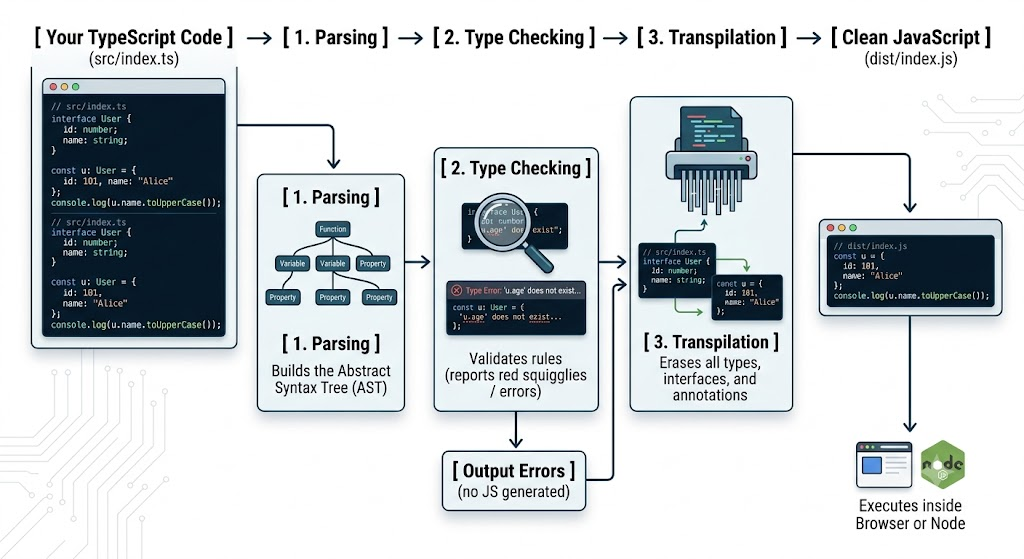
Browsers and runtimes (like default Node.js) understand only valid JavaScript syntax; they do not know what aninterface, atype, or a : string annotation is. TypeScript must be stripped away before execution.
The Two Core Jobs of tsc
Type Checking: Analyzes relationships between structures, validates contracts, and ensures no impossible operations occur.
Type Erasure: Removes all type declarations, interfaces, and type guard syntax, outputting standard, fast ECMAScript.

